Home
Communications portal
User account menu
  • Log in

Breadcrumb

  1. Home
  2. OSCE Communications portal
  3. Resources

    Zoom backgrounds

    Click on the links below to download OSCE backgrounds for Zoom.

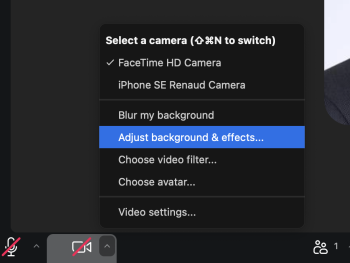
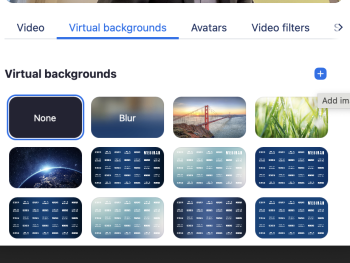
    To use them in Zoom, click on "Adjust backgrounds & effects..." in your camera settings, then click "+ Add image or video".

    Zoom background settings
    Zoom background settings
    • OSCE Zoom background
      light gradient_webinar.png
    • OSCE Zoom background
      light gradient_zoom.png
    • OSCE Zoom background
      official blue dk gradient_webinar.png
    • OSCE Zoom background
      official blue dk gradient_zoom.png
    • OSCE Zoom background
      official blue gradient_webinar.png
    • OSCE Zoom background
      official blue gradient_zoom.png
    • OSCE Zoom background
      official blue_webinar.png
    • OSCE Zoom background
      official blue_zoom.png
    • OSCE Zoom background
      secondary blue gradient_webinar.png
    • OSCE Zoom background
      secondary blue gradient_zoom.png
    • OSCE Zoom background
      secondary blue_webinar.png
    • OSCE Zoom background
      secondary blue_zoom.png
    • OSCE Zoom background
      yellow-green gradient_webinar.png
    • OSCE Zoom background
      yellow-green gradient_zoom.png

    Book traversal links for Zoom backgrounds

    • Marketplaces
    • Up
    • Multimedia library
    • Logo
    • Color palette
    • Typography
    • Guidelines
    • Resources
      • Corporate identity templates
      • Copyright information
      • Marketplaces
      • Zoom backgrounds
    • Multimedia library
    • Internal Resources
    Powered by Drupal